osmosisd
Minimum Requirements
The minimum recommended specs for running osmosisd is as follows:
- 8-core (4 physical core), x86_64 architecture processor
- 32 GB RAM (or equivalent swap file set up)
- 1 TB of storage space
You can check if you have enough storage to run osmosisd here.
Command Help
Go to commands to learn more.
Quick Start
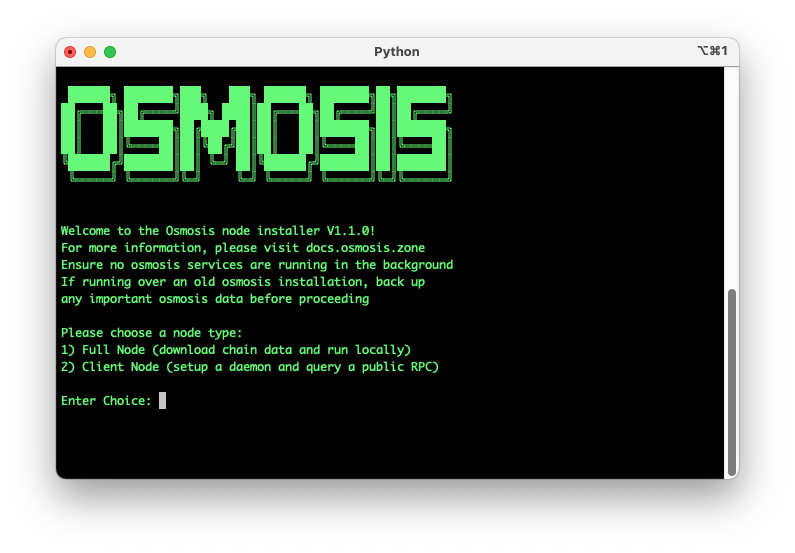
Go to https://get.osmosis.zone/ or copy and paste the following into your terminal, then follow the onscreen instructions:
curl -sL https://get.osmosis.zone/install > i.py && python3 i.py
If you are running on an Apple M1 Chip and are running into issues with osmosisd not being a recognized command:
git clone https://github.com/osmosis-labs/osmosis.git
cd osmosis
make build
sudo cp build/osmosisd /usr/local/bin
Manual Installation
Update System
This guide will explain how to install the osmosisd binary onto your system.
On Ubuntu, start by updating your system:
sudo apt update
sudo apt upgrade --yes
Install Build Requirements
Install make and gcc.
sudo apt install git build-essential ufw curl jq snapd --yes
Install go:
wget -q -O - https://git.io/vQhTU | bash -s -- --version 1.23.4
After installed, open new terminal to properly load go
Install Osmosis Binary
Clone the osmosis repo and check out the current mainnet release tag (replace v31.0.3 below with the latest tag from the Osmosis releases page):
cd $HOME
git clone https://github.com/osmosis-labs/osmosis
cd osmosis

git checkout v31.0.3

make install
If you came from the testnet node instruction, click here to return
If you came from the mainnet node instruction, click here to return
Build from Source
If you are developing on Osmosis rather than just running the binary, build from the source code directly so you can compile and test local changes.
Osmosis currently uses Go 1.23 to compile the code (see go.mod for the canonical version). Install Go 1.23 and verify it:
$ go version
go version go1.23.4 darwin/amd64
Get the source by downloading a release or cloning the git repository, then build:
cd osmosis
make build
After building, you will see a new executable at osmosis/build/osmosisd. (make install instead places the binary on your PATH, as in the Manual Installation above.)
Run Tests
Run the test suite from the source code:
cd osmosis
make test
Commands
This section describes the commands available from osmosisd, the command line interface that connects a running osmosisd process.
add-genesis-account
Adds a genesis account to genesis.json.
Syntax
osmosisd add-genesis-account <address-or-key-name> '<amount><coin-denominator>,<amount><coin-denominator>'
Example
osmosisd add-genesis-account acc1 '200000000uOsmo,550000ukrw'
collect-gentxs
Collects genesis transactions and outputs them to genesis.json.
Syntax
osmosisd collect-gentxs
debug
Helps debug the application.
export
Exports the state to JSON.
Syntax
osmosisd export
gentx
Adds a genesis transaction to genesis.json.
Syntax
osmosisd gentx <key-name> <amount><coin-denominator>
Example
osmosisd gentx myKey 1000000uOsmo --home=/path/to/home/dir --keyring-backend=os --chain-id=test-chain-1 \
    --moniker="myValidator" \
    --commission-max-change-rate=0.01 \
    --commission-max-rate=1.0 \
    --commission-rate=0.07 \
    --details="..." \
    --security-contact="..." \
    --website="..."
help
Shows help information.
Syntax
osmosisd help
init
Initializes the configuration files for a validator and a node.
Syntax
osmosisd init <moniker>
Example
osmosisd init myNode
keys
Manages Keyring commands.
query
Manages queries.
rosetta
Creates a Rosetta server.
Syntax
osmosisd rosetta
start
Runs the full node application with Tendermint in or out of process. By default, the application runs with Tendermint in process.
Syntax
osmosisd start
status
Displays the status of a remote node.
Syntax
osmosisd status
tendermint
Manages the Tendermint protocol.
testnet
Creates a testnet with the specified number of directories and populates each directory with the necessary files.
Syntax
osmosisd testnet
Example
osmosisd testnet --v 6 --output-dir ./output --starting-ip-address 192.168.10.2
tx
Retrieves a transaction by its hash, account sequence, or signature.
Syntax to query by hash
osmosisd query tx <hash>
Syntax to query by account sequence
osmosisd query tx --type=acc_seq <address>:<sequence>
Syntax to query by signature
osmosisd query tx --type=signature <sig1_base64,sig2_base64...>
txs
Retrieves transactions that match the specified event query, where results are paginated. --query is required and takes CometBFT query syntax, so string values are single-quoted and multiple conditions are joined with AND.
Syntax
osmosisd query txs --query "<type>.<key>='<value>'" --page <page-number> --limit <number-of-results>
Example
osmosisd query txs --query "message.sender='osmo1...' AND message.action='withdraw_delegator_reward'" --page 1 --limit 30
Older binaries used --events with &-joined conditions; both were removed in Cosmos SDK v0.50.
comet unsafe-reset-all
Resets the blockchain database, removes address book files, and resets data/priv_validator_state.json to the genesis state. Note this is a subcommand of comet; the bare osmosisd unsafe-reset-all form was removed.
Syntax
osmosisd comet unsafe-reset-all
Resetting priv_validator_state.json discards the record of the last height and round your consensus
key signed. On a node whose key is in an active validator set this can lead to double signing, which
is slashed and permanently jails the validator. Restrict this to a fresh home directory that has
never signed. See Validator Security and Recovery.
validate-genesis
Validates the genesis file at the default location or at the location specified.
Syntax
osmosisd validate-genesis </path-to-file>
Example
osmosisd validate-genesis </genesis.json>
version
Returns the version of Osmosis you're running.
Syntax
osmosisd version